


MapQuest: Get Directions
4.424.77K Reviews
App Specs
- Version
- 10.30.0
- Updated On
- License
- Free
- Downloads
- 10,000,000+
- Developer
- MapQuest
- Categories
- Maps & Navigation
- Platform
- Android, iOS
Screenshots
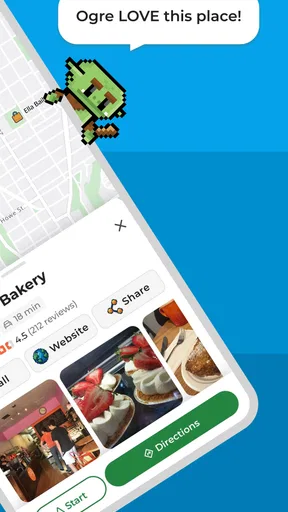
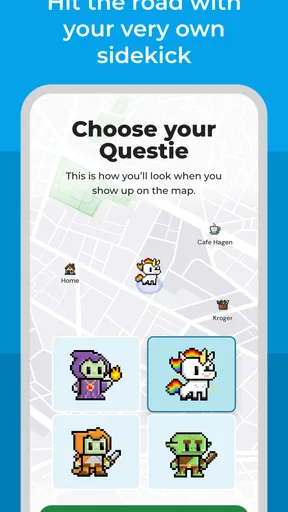


 Analysis by AppCompare
I judge a navigation app less by how impressive it looks in a quiet room than by what happens when I’m late, traffic shifts, or I need to change plans halfway through a drive. That is where MapQuest: Get Directions has to earn its place: by helping me make the next decision without turning the phone into another distraction. Its focus on routes, spoken directions, and traffic makes it a practical option for everyday driving, though it is not automatically the best fit for every trip or every driver.
What I expect from its pace
MapQuest is a free maps and navigation app from MapQuest, and its overall purpose is easy to understand: plan a route, follow it, and keep an eye on changing road conditions. The app has an average rating of 3.3 from around 68,000 ratings, so I would approach it with sensible expectations rather than assume every experience will feel equally smooth. That figure does not tell me exactly how it will behave on a particular phone or route, but it is a useful reminder to try it on a familiar journey before relying on it for an important one.
In ordinary use, perceived speed is not just how quickly a map appears. It is also how easily I can enter a destination, check the route, and get back to driving with the phone put away. A short test before leaving helps me catch small annoyances while I am still parked: confirm the destination, review the route, and make sure voice guidance is audible. That little routine matters more than repeatedly tapping the screen once the car is moving.
When a trip gets busy
The app’s multi-stop routing is especially useful when an errand is more complicated than a single drive across town. I can think through the stops before setting off instead of keeping a list in my head and improvising at every intersection. For a day with a pickup, a grocery stop, and a final appointment, I would enter the destinations while parked, then check that the order makes sense for the day. Route optimization can help organize the journey, but I would still review the proposed sequence: the fastest-looking order is not necessarily the one that suits opening hours, a scheduled pickup, or the reason I am making each stop.
Traffic information is most valuable when it changes a decision, not when it simply adds color to the screen. If congestion appears, I would compare the suggested alternative with the road I already know rather than switch routes automatically. A detour can look attractive on a map yet involve unfamiliar turns or a less comfortable drive. The useful trade-off is having another option to consider while keeping my own judgment in the loop.
Reliability, signals, and sensible recovery
A navigation app depends on the situation around it as well as the software. MapQuest may take longer to load directions in a weak-signal area, so I would avoid leaving route planning until I am already on an isolated stretch. Before a longer drive, I would set the destination where reception is dependable and give the route time to load. If directions appear delayed, I would pull over safely before trying again, rather than troubleshoot while driving.
Voice guidance is a practical way to reduce the need to glance at the display, but it does not remove the need to pay attention to road signs and conditions. I would treat spoken prompts as assistance, not authority—particularly if roadworks, a closed street, or a last-minute change makes the indicated turn unsuitable. If the app falls behind after a missed turn, pausing somewhere safe to check the route is a better recovery plan than making a sudden maneuver to follow an instruction.
Worth Reading Before You Choose

EA SPORTS FC Mobile 26 Is a Bigger Football Game, but It Takes Time

Flipboard Shows What News Apps Must Do Beyond the Feed

Switching to Android Auto Means Rethinking Your Driving Routine

Google Calendar Makes a Crowded Week Easier to Manage

Ludo King Makes the Most of the Minutes Between Plans

Baby Panda World Brings Quick Play to Modern Phones, but Its Game Library Feels Busy
Device fit and day-to-day use
The app is listed for everyone and is free to download, with in-app purchases ranging from $1.99 to $4.99 per item. It has been available since February 15, 2011, and version 10.11.0 requires operating system 7.0 or later. Those details make compatibility worth checking before installing, especially if a device is older or its software has not been updated. I would also leave enough battery for the whole drive and secure the phone in a mount; navigation is only convenient when the screen is visible without holding the device.
MapQuest has over 10 million installs, but popularity alone does not answer whether it suits my needs. I would choose it for familiar driving, errands that benefit from several stops, and trips where spoken guidance and traffic-aware route choices are useful. If I mainly travel on foot or rely on public transit, I would compare it with an app built around those journeys instead. Drivers who need a dependable plan in places with weak reception should test their setup on local roads first and keep a broader backup plan for longer trips.
Have you ever found yourself lost in a new city, desperately looking around for street signs or asking random strangers for directions? We've all been there. That’s why I decided to give MapQuest: Get Directions a shot, and boy, was I in for a treat! Let me walk you through my experience with this app, which has now become my trusty travel companion.
The First Impression
Downloading MapQuest: Get Directions was a breeze. Available for both Android and iOS, I quickly found it on the app store and hit that download button. Right off the bat, the app’s interface struck me as user-friendly and intuitive. No clutter, just clear menus and easy-to-read fonts. It’s like the app was saying, "Hey, relax, I got this!"
Features That Stand Out
Once I started exploring, I realized that MapQuest isn’t just about getting from point A to point B. It's packed with features that make it a comprehensive navigation tool. Here’s what stood out to me:
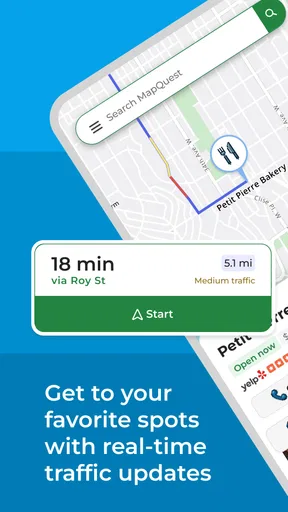
- Live Traffic Updates: This feature is a game-changer. It gives you real-time traffic conditions and suggests alternative routes to avoid congestion. It’s perfect for those of us who have a knack for hitting every red light.
- Multi-Stop Routes: Planning a road trip with multiple destinations? No problem. You can add several stops along your route, and MapQuest optimizes the journey for you. This made my recent weekend getaway so much smoother.
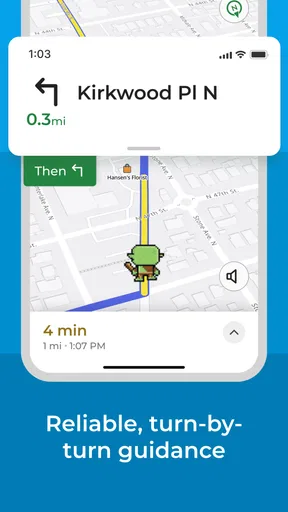
- Voice Navigation: I loved that I could just listen to directions without having to constantly glance at my phone. It’s like having a co-pilot who never gets tired.
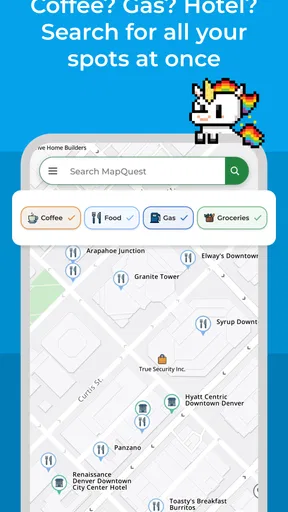
- Gas Finder: Running low on fuel? The app helps you locate the nearest and cheapest gas stations. Definitely saved me a few bucks!
Using the App on the Go
Out on the road, the app performed flawlessly. The maps loaded quickly, and the turn-by-turn navigation was precise. I never found myself second-guessing the directions, which is a huge plus. And let’s not forget about the handy "Explore Nearby" option. Whether I needed a quick coffee fix or a spot to grab lunch, MapQuest had me covered with suggestions.
Integration with Other Apps
Another cool thing? MapQuest plays nicely with other apps. You can easily share your location or route details via text or email. This feature came in handy when I was meeting friends and needed to send them my ETA.
What Could Be Improved?
Every rose has its thorns, right? While I thoroughly enjoyed using MapQuest, there were a couple of hiccups. The app occasionally took a bit longer to load directions in areas with weak network signals. Also, I noticed that the user interface could benefit from a slight update to make it even sleeker. But these are minor issues in an otherwise stellar app.
Wrapping It Up
In a world brimming with navigation apps, MapQuest stands out with its robust features and reliability. It’s not just about getting directions; it’s about enhancing the travel experience. Whether you’re commuting daily or embarking on a cross-country adventure, this app is a must-have. So go ahead, download it, and let MapQuest steer you towards your next destination with confidence!
A realistic errand run
For a concrete example, picture leaving home for a pharmacy pickup, then heading to a supermarket before meeting someone across town. I would enter all three destinations before starting, check the order, and use the traffic view to decide whether the direct route still makes sense. If the pharmacy takes longer than expected, I would reassess while parked rather than assume the original timing still applies. The useful point is not that a route planner can predict the whole afternoon; it is that having the stops together makes the overall plan easier to inspect.
The gas finder adds a different kind of practical value. I would use it before the tank becomes urgent, especially when I am unfamiliar with an area, and compare nearby options rather than divert solely for a small expected saving. A station that is marginally cheaper may not be worth an awkward detour or a delayed arrival. Used this way, the feature supports a decision without making it for me.
How it fits beside familiar alternatives
Most drivers already have a navigation app on their phone, so the question is not whether MapQuest can draw a route; it is whether its particular mix of driving tools is convenient enough to keep using. Compared with a map app that emphasizes walking, transit, or local discovery, MapQuest’s strongest case is a car journey that may include traffic changes, several stops, or a need to locate fuel. If my day is mostly transit connections or walking through a dense city, I would choose an alternative whose main interface is designed around those modes rather than work around a driving-first experience.
There is also a meaningful difference between a familiar default app and a second navigation option. I would not switch every trip just to compare screens. Instead, I would test MapQuest on a route I know, where I can judge whether its directions are clear and whether its timing and route suggestions fit my habits. Keeping a second option available can be helpful when one route view is easier to interpret, but comparing apps while moving is a distraction, so I would make that choice before setting off.
Small habits that improve the experience
One useful workflow is to prepare the whole route while stationary, then share the route or location details with the person waiting at the destination. That avoids trying to send an update at a junction and gives the other person a clearer idea of where I am headed. For a longer outing, I would also check that the phone is mounted securely and that the spoken prompts can be heard over the car’s usual noise. These are simple steps, but they reduce the temptation to handle the phone during the drive.
I would be cautious about treating traffic suggestions as a promise that a route will be faster. Conditions can change, and an unfamiliar shortcut may be more stressful than staying on a known road. When I have passengers, tight arrival plans, or several stops, I would build in flexibility rather than relying on a perfectly timed sequence. Navigation can make choices easier to see; it cannot remove uncertainty from the road.
Who should try it, and who may prefer something else
I see the clearest fit for drivers who want voice directions, traffic-aware choices, and an organized way to handle errands with multiple destinations. It is also worth trying if locating fuel and nearby places is part of how you plan a drive. Someone who already likes MapQuest’s route presentation may find it a comfortable alternative to their usual navigator, especially for routine car trips.
I would hesitate to recommend it as the only navigation plan to a driver who often travels beyond reliable network coverage, or to someone who needs a specialized offline, transit, or walking workflow. I would also be cautious if a phone is old, low on battery, or uncomfortable to mount safely. The app is free to download, but the listed in-app purchases mean a user who wants to avoid optional spending should review any purchase prompts carefully rather than assume every in-app item is included at no cost.
What I would check before depending on it
Before a first important drive, I would run a short local test: choose a destination, listen to a few spoken prompts, and see whether the route is easy to follow from the mounted phone. I would try adding more than one stop while parked, because that is the moment to learn the planning flow—not when I am already running behind. If the app seems slow in a particular area, I would give it time to load before leaving and keep road signs and common sense in charge if its directions do not match what I see.
For a daily commute, I would pay attention to whether the traffic-aware route actually helps with my usual departure times. A suggestion that saves effort on one morning may not be worthwhile every day, and I would not change a trusted routine without a good reason. This kind of personal trial is more useful than judging an app from a single unfamiliar trip: route clarity, signal conditions, and the way I use voice prompts all affect the experience.
My performance verdict
My overall view is that MapQuest is a capable driving companion when the trip benefits from clear voice guidance, several planned stops, or a quick look at traffic and nearby fuel. It can feel straightforward on a familiar route, while weaker reception is a real point of friction when directions take longer to load. I would not call it a universal replacement for every maps app, nor would I depend on any phone-based navigator without checking the route and mounting the device safely.
If you mainly drive and want these tools gathered in one place, I think it is reasonable to try MapQuest on an ordinary errand before making it your go-to. If your priority is travel without dependable connectivity or navigation built around another way of getting around, a better-matched alternative will likely serve you more comfortably. For me, its value is in practical trip planning, not in promising a perfect drive every time.
Pros
- User-friendly interface for easy navigation.
- Accurate turn-by-turn driving directions.
- Real-time traffic updates and rerouting.
- Comprehensive local business search.
- Offline maps available for download.
Cons
- Ads can be intrusive during use.
- Limited features compared to competitors.
- Occasional GPS signal issues.
- User interface feels slightly outdated.
- Some features require in-app purchases.
FAQs for MapQuest: Get Directions
What features does MapQuest offer for navigation?
MapQuest provides a comprehensive suite of navigation features, including real-time GPS guidance, live traffic updates, and customizable route options. Users can also access voice-guided directions and explore various map views such as satellite and street views. Additionally, it offers points of interest and the ability to save favorite locations.
Is MapQuest free to use, and are there any in-app purchases?
MapQuest is free to download and use, offering a wide range of navigation and mapping features at no cost. However, like many apps, it may include optional in-app purchases or advertisements that enhance the user experience, such as ad-free navigation or additional map details.
How does MapQuest handle live traffic updates?
MapQuest integrates real-time traffic data to provide users with the most efficient routes, helping to avoid congestion and delays. The app continuously analyzes traffic conditions and suggests alternative routes if necessary, ensuring timely arrivals and a smoother driving experience.
Can I use MapQuest offline, and how do I download maps?
MapQuest primarily functions online to deliver real-time updates and accurate directions. However, users can download maps for offline use, which is especially helpful in areas with poor internet connectivity. This feature is crucial for ensuring uninterrupted navigation during travel.
What platforms is MapQuest available on, and is it compatible with all devices?
MapQuest is available on both Android and iOS platforms, ensuring compatibility with a wide range of smartphones and tablets. Users can download the app from Google Play Store or Apple App Store. It's designed to work seamlessly across various devices, providing consistent navigation support.


